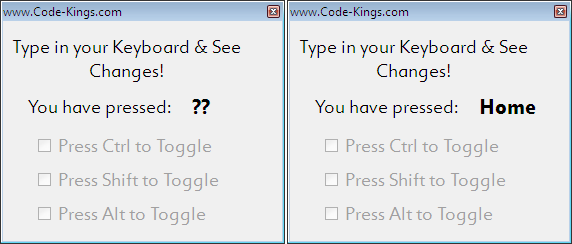
Identify Any Key Pressed on Keyboard


Now you can capture any key pressed on the keyboard, not only restricted to the English or your language letters but also various other keys such as the Windows Key, Properties Key, F1, F2 and other function buttons, the Home, PageUp and PageDown etc. 

Draw a Bitmap Image on WinForm During Runtime


Would you like to draw a bitmap on the screen? Drawing on the WinForms is very easy using the Graphics() Class and Objects. You can draw any type of image by taking the image from your HDD and including file types like BMP, JPEG, PNG etc. Watch the screenshot of a file that is drawn to the WinForm:


Create a Web Browser in C#


This article shows you how to easily create a Web Browser with minimal standard functions containing all standard buttons like the Back, Forward Stop and Home buttons. See below image for more details:


How to Multithread in C#


This WinForms C# Application will show you the basics of creating and using a thread and a bit more. It will actually show you multiple threads working simultaneously. As you know that threads are meant to do multiple jobs at a time by utilizing the different logical cores of the CPU, we will use this to work the value of multiple Int64 variables. See the application screenshot when the application starts and look for the source code at the end:


Reading a Text File in C# through Stream Reader


This C# program shows you how you can load an external Text File from your Hard Disk into a Multi-Line TextBox. The procedure consists of creating the StreamWriter object to begin working which is the feature of this code.  Watch the image above.

Working With Enumerations in C#


.Net Enumeration Basics

Enumerations or simply Enums in short provide convenient ways to create and access named numeric constants. These constants can have custom Indexable values that represent each individual element. Unlike arrays, they can have values which are not incremental in steps of ‘1’. Also, these values can be of types other than integers (which is the default) such as bytes, Boolean etc.

A single Enumeration itself has a group of values associated with it. We create an Enum Object before attempting to use the functions that are offered. This value when used with a dot operator on an Enumeration gives the state of the Enumeration Object. When we initialize new Enums of a previously defined Enum, we don’t use the new operator. The new Enums are almost immediately created and initialized to an initial value within the Enum.

Create an Enum

What is Upcasting and Downcasting in C# ?

Upcasting is basically an object creation mechanism by which we create objects by referring to their base class. We do this by replacing the sub-class name by the base-class name in the object definition. This particularly comes in handy when you know that a specialized object created will not necessarily use all the functions of a specialized sub-class has got to offer. So, replace a sub-class(inherited class) by a base-class and all you have done is Upcasting.


Read a Value from the Windows Registry in C# 5.0

In the previous post we saw how to create a registry i.e. write a value into the Windows registry. Now we shall retrieve back the exact value that we had written before. To do this we need to retrieve the value in a String variable.

We shall take the value by its exact location & the name of the property. Note that the property resides in a folder and the value we read is the Data of that property. Have a look at the present snapshot of the system:

  • Root Folder is HKEY_CURRENT_USER
  • Parent Folder is CSharp_Website
  • Property/Attribute/Key Name is Really
  • Property/Attribute/Key Value is Yes!

How to Write into Windows Registry in C# 5.0

Developing a real application almost everytime requires the storing of some important values in the Windows Registry. The Windows Registry gives the power to store variables of different types by any application and use them as and when required. You can also store values in the form of texts, external files or saved documents then why use the Registry? Because the Registry allows above all the values to be stored and read in a standardized way which can be read by compatible applications as and when required. Also, the deletion of corresponding files does not alter the information in the Windows Registry. The contents have to be modified explicitly to delete or modify existing values.

The windows registry can be modified using the C# programming interface. In this section we shall see how to write to a known location in the windows registry. The Windows registry consists of different locations in an explorer style and looks as shown below:

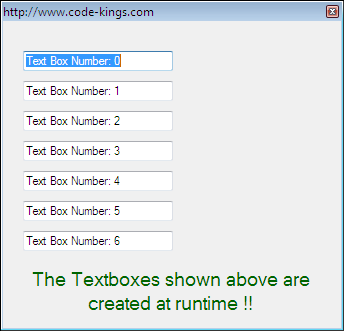
Create Form TextBox Controls at Runtime

Sometimes you might want to create a user control at run-time.  These are times when you are not sure of what controls to include during the form designing phase of your program.  What we usually do is to draw all available controls in the designer form. Then at run-time we simply make the controls invisible leaving us with workable visible controls. But there is a better method. What should be done is exactly illustrated below. You should write code to draw the controls at run-time. You should draw the controls when needed to save memory.


Check for Anagrams in .Net C# 5.0

This program shows how you can check if two given input strings are Anagrams or not in CSharp language. Anagrams are two different words or combinations of characters which have the same alphabets and their counts. Therefore a particular set of alphabets can create many permutations of Anagrams. In other words, if we have the same set of characters in two words(strings) then they are Anagrams. 

We create a function that has input as a character array pair of inputs. When we get the two different sets of characters, we check the count of each alphabet in these two sets. Finally, we tally and check if the value of character count for each alphabet is the same or not in these sets. If all characters occur at the same rate in both the sets of characters, then we declare the sets to be Anagrams otherwise not. 

See the code below for C#: