Showing posts with label C #. Show all posts

C# Encryption and Decryption by Rijndael Method

Another flawlessly written program to up your C# skills! The code is written and tested in Visual Studio 2012. Features of this project are:


  • Encrypt and Decrypt any type of file/s in your computer system.
  • Easy to use interface. Few clicks required only.
  • Choose passkey also known as a password. May consist of letters and numbers[Maximum 8]. 
  • Keep original files intact. You may change code to delete original files but we did not implement this currently. 
  • A class with functions to encrypt and decrypt files is created. This file may be reused.
  • The Rijndael algorithm of Encryption and Decryption is used internally to Cipher & Decipher. 
C# Encryption Decryption


C# 3 X 3 TicTacToe Tutorial


You can find the code to the popular game TicTacToe in C# language using the .Net Framework 4.5. The highlights include the following:
  • Perfectly Written Flawless Code in .Net Framework C# 5 language using WinForms
  • Programmer level only Beginner required. NOT Intermediate. NOT Expert. 
  • The code is explained immediately before being written. 
  • The game's basic functionality is that it has two players put their letters, the X and O in 9 available grid boxes one by one and the player to make a straight line with 3 letters wins. 
  • The Game Counts scores of the individual players and a Reset of the scores is also possible. 
  • Players may reset the current game and start a new game whenever needed. 
  • Please recommend and comment if it worked for you. Thank You for Visiting :) 

Cubic Equation Roots in C# Code


  • The program below perfectly solves the Cubic Equation of the form Ax^3 + Bx^2 + Cx + D.
  • The flawless code is written in .Net C#.
  • The real and imaginary roots are separated by black and red colors respectively.
  • Simply update the value of variables A, B, C and D to see the answers i.e. the solution of the equation. 
  • To find the 2 roots, solution of a Quadratic equation please visit here.
  • This code is written by Code-Kings exclusively for YOU! Please like us wherever possible and show some love in return!


Solve Quadratic Equation Code and Tutorial in C#


You can very easily solve a Quadratic Equation with this small program. Just enter the values in the 3 text boxes and you will find the resulting roots(solutions) of the Quadratic equation on the right. Watch the final output and see the source code further below: 

Solve Quadratic Equation in C# WinForms Application

The C# Code below is simple, structured & complete. Note the code for the text box change event is similar for all the 3 text boxes. 

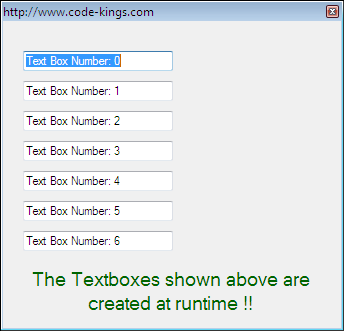
Create Form TextBox Controls at Runtime

Sometimes you might want to create a user control at run-time.  These are times when you are not sure of what controls to include during the form designing phase of your program.  What we usually do is to draw all available controls in the designer form. Then at run-time we simply make the controls invisible leaving us with workable visible controls. But there is a better method. What should be done is exactly illustrated below. You should write code to draw the controls at run-time. You should draw the controls when needed to save memory.


Properties in C#

Properties are used to encapsulate the state of an object in a class. This is done by creating Read Only, Write Only or Read Write properties. Traditionally, methods were used to do this. But now the same can be done smoothly & efficiently with the help of properties. 

Random Generator Class in C#


The C Sharp language has a good support for creating random entities such as integers, bytes or doubles. First we need to create the Random Object. The next step is to call the Next() function in which we may supply a minimum and maximum value for the random integer. In our case we have set the minimum to 1 and maximum to 9. So, each time we click the button we have a set of random values in the three labels. Next, we check for the equivalence of the three values; and if they are then we append two zeroes to the text value of the label thereby increasing the value 100 times. Finally we use the MessageBox() to show the amount of money won.


AutoComplete Feature in C#


This is a very useful feature for any graphical user interface which makes it easy for users to fill in applications or forms by suggesting them suitable words or phrases in appropriate text boxes. So, while it may look like a tough job; its actually quite easy to use this feature. The text boxes in C Sharp contain an AutoCompleteMode which can be set to one of the three available choices i.e. Suggest , Append or SuggestAppend. Any choice would do but my favourite is the SuggestAppend. In SuggestAppend, Partial entries make intelligent guesses if the ‘So Far’ typed prefix exists in the list items. Next we must set the AutoCompleteSource to CustomSource as  we will supply the words or phrases to be suggested through a suitable data source. The last step includes calling the AutoCompleteCustomSouce.Add() function with the required. This function can be used at runtime to add list items in the box.


Hello World Program For C #

This is a small program which shows the basic functionality of C#. The program contains 2 labels. The labels are shown to blink alternatively with the help of two timers. Whenever a timer is enabled, the other timer is relaxed and a label linked with the corresponding timer has its visible property set to true while the other label has its visible property set to false. This simple logic gives us the effect of alternative blinking of the labels. You can set the tick property of the timer to a suitable number. This gives the time in milliseconds between the blinks. A word of caution : do not simply copy paste codes written here instead type it in your IDE. For example to type in the code for the first timer timer1 , double click on the timer1 which gives you a fraction of code ready to begin with and then type in the code within the closed block of curly braces.